


Workstream US
3.152.00 Reviews
App Specs
- Version
- v2.12.8
- Updated On
- License
- Free
- Downloads
- 50,000+
- Developer
- Workstream.is
- Categories
- Business
- Platform
- Android
Screenshots
 Analysis by AppCompare
When an hourly team is spread across different shifts, HR problems rarely arrive at a convenient time. A schedule changes, someone needs to check a work detail, a manager has to pass along an update, or an employee needs help while away from a desk. Workstream US is built around that everyday gap: it puts an HR-focused workplace experience on a phone instead of making hourly staff depend entirely on a computer or a manager’s office.
I reviewed it as a business app from Workstream.is, and my main impression is that its value depends less on flashy extras and more on whether your workplace genuinely needs mobile HR for hourly teams. It is free to download, suitable for Everyone, and its current release is v2.12.8. The app has reached over 50 thousand installs, with a 3.2 average from more than 100 ratings and over 50 written reviews. That mixed reception feels important: this is useful in the right work environment, but it is not the kind of app I would recommend blindly to every employee or small business.
Why mobile HR matters more for hourly workers
The central capability is simple to understand: Workstream US gives hourly employees a way to interact with workplace HR tasks while they are on the move. That matters because hourly work is often organized around shifts, locations, supervisors, and quick operational changes rather than long periods at a desk.
In a conventional office, an employee can open a desktop HR portal, search through an internal site, or send an email and wait. That workflow is awkward for someone working on a shop floor, in a restaurant, at a service counter, or across several locations. A phone-based approach can shorten the distance between the employee and the information they need. The practical benefit is not merely convenience; it is reducing the number of small HR questions that must travel through another person.
That distinction is where I think the app makes the most sense. It is not trying to replace every business system in a company. Instead, it focuses attention on the employee experience around hourly work. If your team already communicates mostly through supervisors, paper notices, scattered messages, or a desktop portal that few people open, a dedicated mobile channel can make routine HR contact feel more reachable.
At the same time, I would not confuse a mobile HR app with a complete workforce-management solution. A phone interface does not automatically solve poor scheduling practices, unclear policies, slow manager responses, or inconsistent information. Workstream US can make an organized process easier to reach, but it cannot make an unorganized process clear by itself. That is the first trade-off to understand before asking a whole team to adopt it.
The real effect of having HR within reach
For me, the strongest effect is psychological as much as technical. Hourly staff can feel that HR belongs to the company office while their actual work happens somewhere else. A mobile app narrows that separation. Employees do not need to remember which person handles a question, which noticeboard contains an update, or when they can get access to a workstation.
Worth Reading Before You Choose

Flipboard Shows What News Apps Must Do Beyond the Feed

Switching to Android Auto Means Rethinking Your Driving Routine

Google Calendar Makes a Crowded Week Easier to Manage

Ludo King Makes the Most of the Minutes Between Plans

Baby Panda World Brings Quick Play to Modern Phones, but Its Game Library Feels Busy

ESPN’s Live Game View Makes Following Close Games Easier
This is especially useful for teams with changing schedules. A worker who starts early, finishes late, or moves between locations may not overlap with the same manager every day. A mobile HR channel gives the workplace a better chance of presenting information in the same place, even when the people involved rarely meet face to face.
That does not mean every interaction becomes effortless. The app still depends on the employer setting up a useful process and employees knowing when to use it. If a company treats it as another inbox without keeping information current, the experience can quickly become frustrating. My advice is to view Workstream US as a front door to HR, not as a substitute for clear internal ownership.
What using it feels like in a normal workday
The most realistic use case is not an employee spending an hour exploring the app. It is a short check during a busy day. Imagine a restaurant worker whose shift pattern changes during a busy week. Instead of waiting for the next time they see a supervisor, they use the mobile HR channel to check the latest workplace information or follow the appropriate employee process. The benefit comes from removing delay and uncertainty from a small but important task.
Another scenario is a multi-location business where staff do not share one physical noticeboard. A mobile HR app can give employees a consistent place to look rather than relying on each location to display the same message correctly. That is a useful operational insight: the app’s value increases when the workforce is physically dispersed, but only if managers maintain one dependable source of information.
I also see a benefit for supervisors who are constantly interrupted by repeat questions. When basic HR communication has a clear mobile route, managers can spend less time acting as a human directory. However, that works only when the app’s content is written plainly. A badly organized policy remains badly organized on a phone, and a vague instruction becomes even more irritating when the employee is trying to read it between tasks.
Small workflow choices that make a difference
One useful way to approach Workstream US is to decide in advance which questions should go through the app and which should still go directly to a manager. This prevents the mobile channel from becoming a dumping ground for urgent operational issues. Shift emergencies, safety matters, and immediate customer problems may need a faster human response, while routine HR communication can be handled through the app.
A second practical tip is to introduce it around a real employee moment rather than during a long training session. Ask staff to use it for one relevant HR task, then explain where it fits in the wider workplace process. Hourly employees are more likely to remember a tool when it solves a problem they have just experienced. A generic presentation about “digital transformation” is much less useful than showing the exact route for a common question.
A third insight is that managers should review the mobile experience from the employee’s point of view. What looks obvious to an administrator may not be obvious to someone opening the app during a short break. Keep instructions short, use consistent terms, and avoid sending people back and forth between the app and informal messages. The best result comes when Workstream US reduces steps instead of simply adding another place to check.
There is also a trust issue. Employees need to understand what the app is for and what kind of response they can expect. If they assume every message will receive an immediate answer, disappointment follows. If the company explains which items are informational, which require action, and how urgent matters are handled, the app becomes easier to use responsibly.
Where it fits beside familiar alternatives
The usual alternatives are a desktop HR portal, email, paper notices, text messages, or direct conversations with supervisors. Each has a place, but none is ideal for every hourly workforce. A desktop portal may offer more room for complex information, yet it is less convenient for employees who rarely sit at a computer. Paper is visible in one location but fails for staff who work elsewhere or miss a notice. Email can be searchable, but many hourly workers do not treat a work inbox as their main daily tool.
Text messaging is immediate, but it can mix personal and work communication and become difficult to organize. A supervisor remains valuable for context and urgent judgment, but relying on that person for every routine HR question creates bottlenecks and inconsistent answers. Workstream US sits between these options: it gives the company a dedicated mobile route while preserving the need for human support when a situation is complicated.
That middle position is both its strength and its limitation. A business looking for a broad scheduling, payroll, time-tracking, recruiting, and workforce analytics platform should compare it with a larger all-in-one service. A business mainly trying to make HR more accessible to hourly staff may find the narrower focus more practical. I would choose based on the problem first, not on the fact that the app is available at no charge.
The best environment for the app
Workstream US is most convincing for employers with hourly teams that are mobile, shift-based, or distributed across locations. Retail, hospitality, service operations, and similar workplaces are the kinds of environments where a phone-first HR connection can remove friction. It can also help companies where many employees do not have a company computer or a regular desk.
The strongest scenario is a business with enough structure to maintain HR information but not enough day-to-day overlap for traditional communication to work smoothly. In that setting, the app can become a reliable meeting point between employees and the organization. It is particularly sensible when managers are spending too much time repeating basic information or when employees cannot easily find the latest workplace guidance.
I would be more cautious for a very small team where everyone works together and can answer questions immediately. In that situation, adding an app may create more administration than value. I would also hesitate if the workforce is uncomfortable using smartphones for work, has limited connectivity during shifts, or needs a highly specialized system that combines HR with detailed operational controls. The free price removes a financial barrier, but it does not remove the cost of onboarding, maintenance, and employee attention.
Limitations I would consider before rollout
The 3.2 average rating suggests that the experience is not universally smooth, and I would take that seriously without treating it as the whole story. Ratings can reflect different employers, devices, expectations, and support experiences, but they still warn me that adoption should be tested rather than assumed. A pilot with a small group of hourly employees is a sensible step before making it central to every HR interaction.
The biggest likely friction is organizational. Employees may not know whether to check the app, contact a supervisor, or search another workplace channel. If the employer does not establish one clear rule, the app can add duplication instead of removing it. Managers may also need time to keep information accurate and respond consistently. Those are not minor details; they determine whether a mobile HR tool feels dependable.
There is a second trade-off around screen size. A phone is excellent for short actions and quick reference, but less comfortable for reading long policies or comparing complicated information. Employers should avoid treating the mobile format as a reason to compress every document into the app. Short summaries, clear next steps, and a sensible path to further help will work better than overwhelming employees with dense text.
Finally, some workers may prefer personal conversations for sensitive issues. A digital route can make access easier, but it should not pressure employees into handling every HR matter through a screen. The right rollout explains when a private conversation is more appropriate and makes sure the app complements, rather than replaces, human support.
Who gets the most value from Workstream US?
Employees gain the most when they need HR access outside normal office routines. A person who works variable shifts, changes locations, or rarely sees a full-time administrator is likely to notice the benefit quickly. The app is also a good fit for workers who prefer checking information independently before asking a manager.
Managers can benefit too, especially when repeated questions interrupt service or operations. The gain is not that managers stop communicating; it is that routine information can have a consistent home. That leaves supervisors more time for exceptions, coaching, and issues that genuinely require judgment.
Employers benefit when they are prepared to treat the app as part of a communication system rather than a standalone download. Before rollout, I would define its purpose, select a few high-value workflows, explain response expectations, and ask employees where they still get stuck. That approach makes it easier to tell whether the app is improving access or merely adding another notification.
People who should skip it are those looking for a general personal productivity tool, a consumer job-search app, or a complete replacement for payroll and workforce operations. Workstream US is specifically positioned around business HR for hourly teams. Its usefulness comes from that focus, so it will feel unnecessary if your workplace already has fast, trusted communication and no meaningful mobile HR gap.
My recommendation after using it
I see Workstream US as a focused solution to a real workplace problem: hourly employees should not have to be physically near an HR office or a desktop computer to stay connected to routine company processes. The app’s best quality is its potential to make HR access fit the rhythm of shift work rather than forcing shift workers into office-style habits.
My recommendation is positive, with conditions. For a distributed hourly workforce, I would test it early and judge it by practical questions: Can employees find the information they need quickly? Do managers receive fewer repeat questions? Do staff understand when the app is the right channel? If the answers are yes, the free entry point makes it a reasonable option to explore.
If your business needs a much broader operational platform, another category of tool may serve you better. If your team is small and highly connected, a dedicated app may not justify the extra process. But when the central challenge is giving hourly workers a dependable mobile connection to HR, that focused purpose is exactly where Workstream US earns its place.
Pros
- Combines work chats
- tasks
- and updates in one organized workspace.
- Custom channels make it easier to separate teams
- projects
- and topics.
- Search helps locate older messages
- files
- and shared information quickly.
- Supports remote collaboration without requiring everyone to be in the same office.
- Notifications can keep users informed about important activity and deadlines.
Cons
- Frequent notifications may become distracting without careful settings adjustments.
- New users may need time to understand channels
- tabs
- and workspace features.
- Performance can vary when handling large workspaces or many active conversations.
- Some useful collaboration features may depend on the selected subscription plan.
- The app may consume noticeable battery during extended messaging and call sessions.
FAQs for Workstream US
What is Workstream US used for?
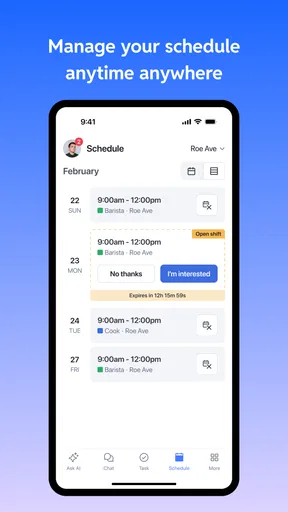
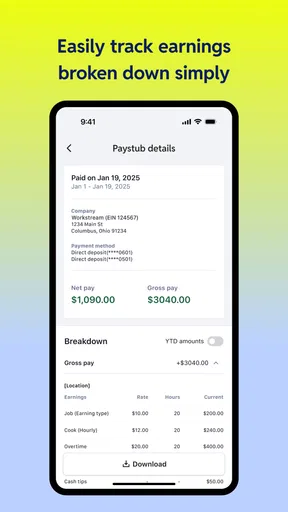
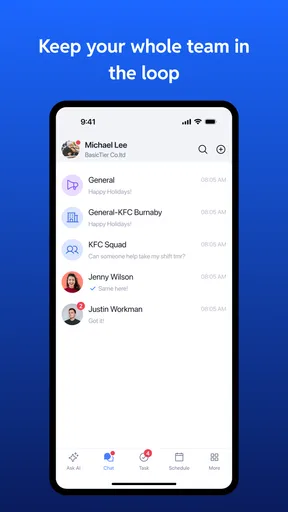
Workstream US is a workforce management and employee communication app designed to help businesses organize daily operations. Depending on how an employer configures it, employees may use it to view schedules, clock in or out, receive workplace announcements, complete assigned tasks, review messages, and access company resources. Available features can vary by organization, job role, and subscription plan.
Who can use the Workstream US app?
Workstream US is generally intended for employees, managers, and administrators working with an organization that uses Workstream’s workforce-management services. Installing the app alone may not be enough to access its features. In most cases, you need an account or invitation provided by your employer, along with the correct company credentials, location, or employee identification details.
Does Workstream US support employee scheduling and time tracking?
Yes, scheduling and time-related tools are among the main reasons organizations provide Workstream US to their staff. Depending on your employer’s setup, you may be able to check upcoming shifts, request availability changes, clock in and out, review worked hours, or receive notifications about schedule updates. The exact tools and permissions may differ between companies.
Is Workstream US free to download and use?
The Workstream US app may be available to download without an upfront charge, but access is normally connected to an organization’s Workstream account or service agreement. Employees typically do not purchase an individual subscription through the app. Some features may also depend on the plan selected by the employer, so the experience can differ from one workplace to another.
What should I do if I cannot log in to Workstream US?
If you cannot sign in, first check that you are using the email address, employee ID, password, or company code supplied by your employer. Confirm that your internet connection is working and that the app is updated. If you have forgotten your password, use the available recovery option. For account activation, locked accounts, missing schedules, or company-specific problems, contact your manager or workplace administrator.


